Collaboration across teams always requires a thoughtful approach – and few tools spark as much discussion as SharePoint and Slack. These platforms take teamwork in very different directions, each shaping how teams communicate, share information, and manage projects.
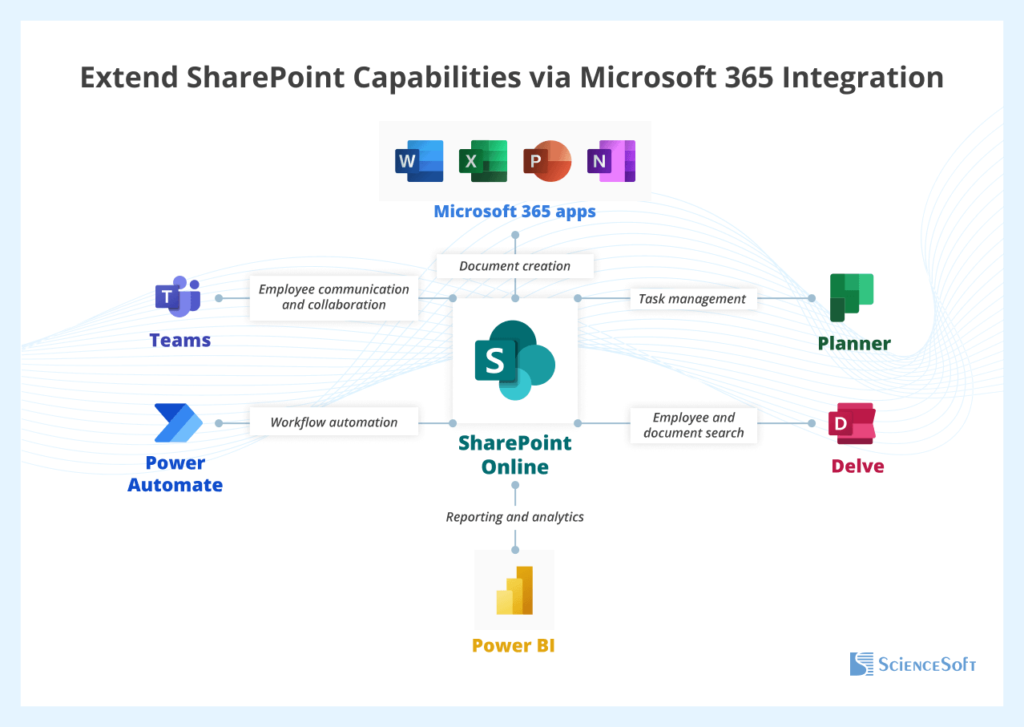
Microsoft’s SharePoint sits at the center of the Microsoft 365 ecosystem, providing structured workflows, document management, and secure internal collaboration. Integrated with Teams, Outlook, OneDrive, and other apps, it offers a centralized hub for company-wide information, making it ideal for larger teams or organizations with document-heavy processes and compliance requirements.
Slack, in contrast, thrives on speed and agility. With real-time messaging, topic-based channels, file sharing, instant notifications, voice and video calls, and thousands of integrations with third-party tools, Slack keeps teams connected and decisions moving quickly. It’s perfect for agile collaboration, though it doesn’t provide the same level of structured document control as SharePoint.
But do you really have to choose one over the other?
At Chanty, we combine the best of both worlds in a single workspace, offering messaging, task management, scheduling, voice/video calls, and more. Teams get structured organization like SharePoint and fast, fluid communication like Slack – all without constantly switching between apps.
In this article, we’ll break down SharePoint vs Slack, explore their strengths and weaknesses, and help you figure out which setup, or combination, works best for your team.
SharePoint vs Slack in a nutshell: What teams need to know fast
We’ve already seen that SharePoint and Slack head in very different directions – one focused on structure and documents, the other on fast, real-time communication. But what happens when we look closer, under the hood? What do these tools really bring to the table, and can one replace the other, or do teams need a bit of both to keep collaboration running smoothly?
Before diving deeper, here’s a quick, scannable stack-up of SharePoint vs Slack so you can see how they compare at a glance.
| Feature / Aspect | SharePoint | Slack |
| Purpose & Focus | Built for document management, structured workflows, and intranet portals. Great if your team needs a centralized hub for files and official processes. | Designed for real-time messaging, fast updates, and team communication. Ideal for teams that thrive on instant collaboration and quick decision-making. |
| Communication & Collaboration | Offers team sites, announcements, and discussion boards, but messaging is limited. Collaboration tends to be more formal and document-centric. | Excels in channels, threads, DMs, voice/video calls, and reactions. Keeps conversations fast and dynamic, perfect for agile teams. |
| Document Management | Strong capabilities: version control, permissions, workflows, and integration with Microsoft 365 apps. Perfect for storing, sharing, and approving documents. | Basic file sharing only. Slack isn’t designed for complex document workflows; it’s better as a supplement to a document management system. |
| Integrations & Ecosystem | Best within the Microsoft 365 ecosystem (Teams, Outlook, OneDrive). Limited third-party apps compared to Slack. | Extensive third-party integrations with tools like Google Drive, Jira, Zoom, Trello, and more. Flexible for customizing workflows. |
| User Experience | Powerful but can feel complex and overwhelming, especially for new users. Some training often required. | Intuitive, easy to adopt, and mobile-friendly. Lightweight and fun to use, though can feel chaotic with too many channels. |
| Security & Compliance | Enterprise-grade security and compliance (GDPR, HIPAA, ISO). Perfect for larger organizations with strict regulations. | Solid security but less enterprise governance. Great for general team communication, not heavy regulatory requirements. |
| Pricing | Usually included in Microsoft 365 plans. Standalone SharePoint plans available. Pricing depends on features and enterprise tier. | Free tier available; Standard ($7.25/user/month), Plus ($12.50/user/month), Enterprise Grid (custom pricing). |
| Best For | Teams needing structured workflows, document-heavy projects, and company-wide intranet portals. | Teams needing quick communication, agile collaboration, and fast updates. |
Breaking down SharePoint vs Slack: Detailed feature analysis
Communication & Collaboration
Communication is at the heart of team collaboration, and SharePoint and Slack handle it very differently. SharePoint is all about structure. Think team sites, discussion boards, and company-wide announcements. It works well for projects where conversations revolve around specific documents or workflows. The catch is that real-time interaction is limited. Teams often respond slower, and staying updated can require navigating multiple pages or sending extra emails.
Slack, on the other hand, is built for speed. Channels, threads, direct messages, and instant notifications keep teams connected and decisions moving fast. It’s perfect for teams that value quick, agile communication. The trade-off is that important messages can get buried in busy channels, and constant notifications can feel overwhelming.
This is where Chanty steps in as a hybrid option. It combines real-time messaging with task management and scheduling. That means teams get the structure of SharePoint with the quick, conversational style of Slack. Tasks and messages are tied together, so follow-ups don’t get lost, and coordination feels smoother.
📍 Winner: Slack is best for teams that need instant messaging and rapid collaboration. SharePoint works better when conversations are tied to structured workflows. And Chanty is a great alternative for teams who want the best of both worlds without juggling multiple apps.
Document management
When it comes to handling files, SharePoint is the heavyweight. It offers version control, detailed permissions, workflow approvals, and seamless integration with Microsoft 365 apps, making it ideal for storing, sharing, and collaborating on documents securely. Teams can create libraries, track changes, and ensure everyone is working on the latest version. For projects where multiple people need to edit, approve, or reference documents, SharePoint provides the structure and reliability that few other platforms can match. The main downside is that it can feel a bit complex for new users, and setting up libraries or workflows can take time and planning.
Slack, in contrast, is built for speed, not structure. Sharing files is quick and convenient, especially during a live conversation or brainstorming session, but the platform doesn’t support advanced workflows or document organization. Files can easily get buried in busy chat channels, and teams relying solely on Slack for document management may find themselves losing track of important files or struggling to maintain version control.
Chanty offers a middle ground. While it’s lighter than SharePoint, it allows teams to attach files directly to tasks and messages, keeping documents linked to the conversations or projects they belong to. It doesn’t provide the full enterprise-grade features of SharePoint, but for teams looking to combine messaging with simple document access, it keeps everything organized and easy to find without the overhead of a complex system.
📍 Winner: For document-heavy workflows and enterprise-level control, SharePoint takes the lead. Slack is better for quick file sharing during conversations, and Chanty serves as a practical hybrid for teams that need messaging and basic file management in one place.
Integrations & ecosystem
SharePoint works best within the Microsoft ecosystem –Teams, Outlook, OneDrive, and other Office apps. If your organization is already invested in Microsoft 365, it’s a powerful way to keep everything connected. However, when it comes to third-party apps, SharePoint falls short. Integrating tools outside the Microsoft environment can be more complex, and the range of available external apps is relatively limited compared to other platforms.
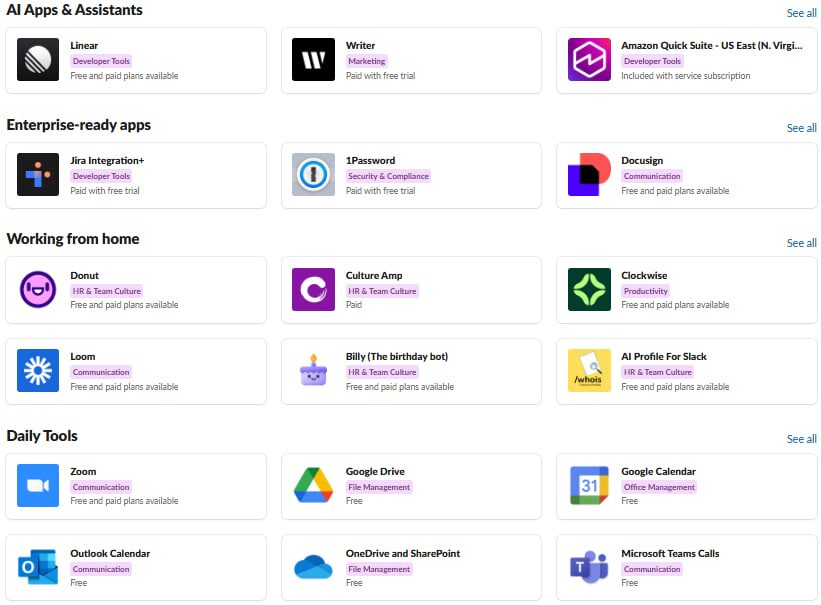
At the same time, Slack is a true hub of integrations, supporting hundreds of apps such as Google Workspace, Jira, Trello, Zoom, and countless others. Teams can automate workflows, connect different platforms, and customize notifications to match their exact needs. That said, having so many options can sometimes feel overwhelming. New users may struggle to set up integrations efficiently, and too many connected apps can lead to notification overload if not managed carefully.
Platforms like Chanty strike a middle ground. It integrates with popular tools enough to streamline workflows without creating the chaos of dozens of connections. You get essential integrations for file sharing, calendar syncing, and project management, keeping your workspace organized and your team focused.
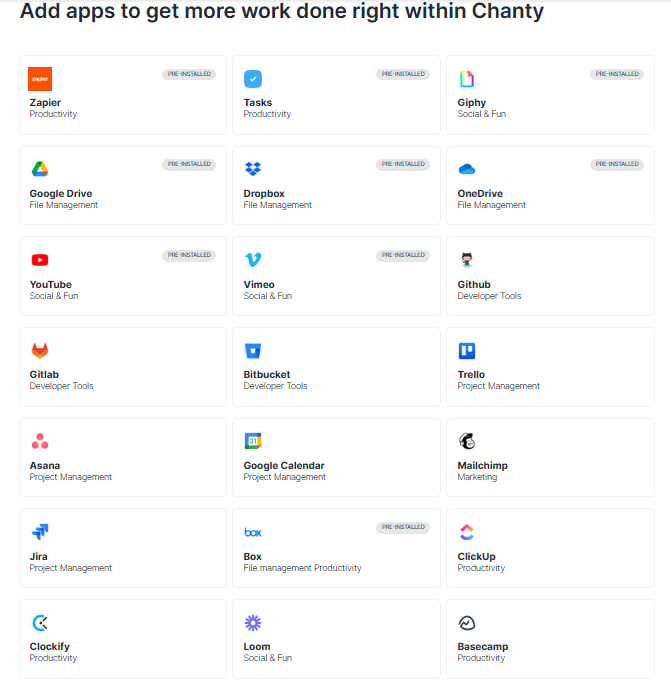
📍 Winner: For sheer integration power, Slack takes the lead, especially for teams that rely on multiple third-party apps. SharePoint is ideal for Microsoft-centric organizations, and Chanty provides a balanced alternative for teams that want integrations without the stress of managing too many connections.
User experience
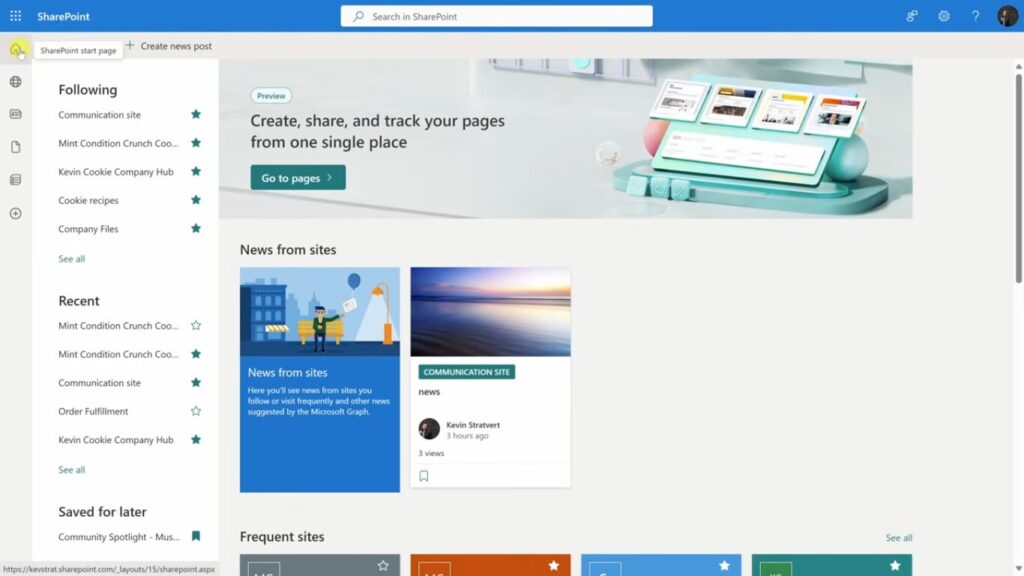
SharePoint is a powerful platform, but its strength can also be its weakness. The interface can feel complex and overwhelming, especially for new users. Setting up sites, libraries, and workflows often requires some training or planning, and teams may struggle to find documents or navigate different sections if they aren’t familiar with the platform. While it’s excellent for structured processes, this learning curve can slow down adoption for teams looking for a quick, intuitive solution.
Slack takes the opposite approach. It’s intuitive, lightweight, and mobile-friendly, so teams can start messaging, creating channels, and integrating tools almost immediately. The simplicity makes onboarding fast, but the trade-off is that high-volume channels can quickly become chaotic if conversations aren’t organized or moderated. Notifications can pile up, and important updates risk getting lost in the flow of messages.

Chanty sits somewhere in between, emphasizing simplicity without sacrificing structure. Its interface combines messaging, task management, and scheduling in one workspace, so teams can communicate and stay organized without bouncing between multiple apps.

📍 Winner: For ease of adoption and day-to-day usability, Slack and Chanty take the lead, with Chanty winning slightly for teams who want both communication and task organization in a single, manageable interface.
Security & compliance
When it comes to security and compliance, SharePoint is the gold standard. It offers enterprise-grade controls and supports protocols such as GDPR, HIPAA, and ISO standards, along with advanced permissions, audit trails, and data retention policies. For organizations handling sensitive documents or operating in highly regulated industries, SharePoint is unmatched. The trade-off is that its extensive features can feel complex to manage, and setting permissions incorrectly can create friction for teams.
Slack provides solid security for general collaboration, including encryption, SSO, and two-factor authentication. However, it doesn’t offer the same level of enterprise governance as SharePoint, meaning teams in highly regulated sectors often pair Slack with other systems to meet strict compliance requirements.
Chanty strikes a balance between usability and security. It provides encrypted messaging and user access controls, and importantly, it adheres to compliance protocols including GDPR, HIPAA, and FINRA. This makes it a reliable choice for teams needing secure communication, task management, and productivity in one platform without compromising on regulatory standards.
📍 Winner: SharePoint remains the leader in enterprise-grade security and compliance, but Chanty stands out for teams needing strong protection and regulatory compliance in a simpler, more flexible workspace. Slack is suitable for teams where agility and usability are the priorities over strict compliance.
Pricing & plans
When it comes to pricing, SharePoint, Slack, and Chanty each take a different approach, reflecting their focus and audience.
SharePoint is usually bundled with Microsoft 365 subscriptions, which can be convenient if your organization is already in the Microsoft ecosystem. Here’s a closer look:
- Microsoft 365 Business Basic ($6/user/month) – Includes SharePoint online, Teams, Exchange email, and OneDrive storage. Good for small teams who want essential collaboration tools in one package.
- Microsoft 365 Business Standard ($12.50/user/month) – Adds desktop Office apps, making it ideal for teams that need both online and offline access.
- SharePoint Online Plan 1 ($5/user/month) – Standalone plan with basic SharePoint features like document libraries, lists, and intranet sites. Great for small teams, though advanced workflow features are missing.
Slack’s pricing is more flexible for teams focused on messaging and collaboration.
- Free – Limited to 90-day message history, 1:1 video/audio calls, and 10 app integrations. Good for small teams or testing, but quickly becomes restrictive as the team grows.
- Standard ($7.25/user/month, billed annually) – Unlimited message history, group video calls up to 15 participants, unlimited integrations, and shared channels with external organizations. This is the sweet spot for many small-to-medium teams.
- Business Plus ($12.50/user/month, billed annually) – Adds SSO, advanced user management, and 24/7 support, ideal for growing teams with security needs.
- Enterprise Grid (custom pricing) – Designed for very large organizations, offering multiple workspaces, enhanced compliance, and governance. Can feel complex to manage for smaller teams.
Chanty takes a simpler, cost-effective pricing approach that blends messaging and task management.
- Free – Unlimited messaging, audio/video calls, task management, and basic integrations for small teams (up to 10 users).
- Business ($3/user/month, billed annually) – Adds unlimited users, Teambook (tasks + messages in one feed), unlimited integrations, group calls, and priority support.
- Enterprise options – Scalable plans with advanced admin controls, storage, and security for larger organizations.
📍 Winner: For small teams on a budget, Chanty clearly leads, offering messaging, tasks, and calls at a fraction of the cost. For organizations already invested in Microsoft, SharePoint makes sense despite higher pricing, especially if document management and workflows are priorities. Slack sits in the middle, flexible but potentially costly for larger teams.
Best use cases
Knowing when and where each tool shines helps you choose the right fit–or even decide if a combination works better.
SharePoint is best for structured, document-heavy workflows. It excels in:
- Handling complex projects with multiple stakeholders.
- Managing internal portals or intranet sites for company-wide announcements.
- Enforcing version control, approval workflows, and compliance regulations.
- Teams fully embedded in the Microsoft 365 ecosystem.
The downside? SharePoint can feel heavy and less agile, especially for teams that need fast, casual communication.
Slack thrives in fast-paced, agile environments:
- Perfect for small to medium teams needing instant messaging, notifications, and collaborative brainstorming.
- Supports numerous third-party integrations, which can supercharge workflows.
- Ideal for organizations prioritizing team culture, engagement, and real-time collaboration.
Its limitation is that Slack alone doesn’t manage documents or structured workflows, so teams often pair it with SharePoint or other tools.
Chanty offers a balanced middle ground:
- Combines messaging, task management, and scheduling in one interface.
- Simplifies workflows without the complexity of SharePoint or the chaos of Slack.
- Well-suited for remote or hybrid teams that need coordination and productivity in one place.
Verdict:
- If your team is document-heavy and structured, SharePoint is the go-to.
- For instant, dynamic communication, Slack wins.
- For teams wanting a single, balanced workspace without juggling multiple tools, Chanty is the clear choice.
Using SharePoint and Slack together
It’s not always a matter of choosing SharePoint or Slack. Many teams find that using both together gives the best balance – SharePoint for structured work and Slack for real-time communication.
Here’s how teams can make it work in practice:
1. Link SharePoint files directly in Slack
Instead of digging through SharePoint folders, teams can share important documents straight in Slack channels. This ensures everyone has quick access to the files without leaving their chat environment. Most SharePoint files can be linked with previews, so team members know exactly what they’re opening.
2. Get Slack notifications for SharePoint updates
Set up alerts for key SharePoint events – like new approvals, file uploads, or workflow changes – and have them post directly in Slack channels. This keeps the team updated in real-time while centralizing conversations around the files.
3. Use Slack to discuss and track decisions
Discussions often start spontaneously in Slack. Teams can summarize decisions and link back to SharePoint documents for permanent reference. This helps combine the speed of chat with the structured record-keeping of SharePoint.
4. Organize channels by projects or departments
Create dedicated Slack channels for each project or department, and link them to the corresponding SharePoint site. This way, all conversations, files, and updates stay organized and easy to find.
5. Combine with task management
If your team uses SharePoint workflows or task lists, Slack can serve as a real-time reminder and collaboration space. Notifications about due dates, updates, or approvals can land in Slack so everyone stays on top of tasks.
Where Chanty fits:
For teams who want all of this in a single workspace, Chanty can act as a hybrid solution. Messaging, task management, file storage, and scheduling all live in one interface, reducing the need to constantly switch between apps. It’s especially helpful for smaller teams or startups that want speed, structure, and simplicity.
SharePoint vs Slack: Which one fits your team?
SharePoint and Slack both bring valuable tools to the table, but they serve very different needs. SharePoint is built for structure and organization – document management, workflows, intranet sites, and enterprise-level security. It’s ideal for teams handling large volumes of files or projects that require strict version control and compliance.
Slack, on the other hand, thrives on speed and real-time communication. Instant messaging, threads, notifications, and integrations make it perfect for agile teams that need fast collaboration and quick decisions. However, Slack isn’t designed for structured project management or handling complex document workflows.
So, who wins in the SharePoint vs Slack debate? It depends on your priorities:
- Need structured projects, document-heavy work, and regulated content? SharePoint is the go-to.
- Need fast messaging, instant collaboration, and dynamic teamwork? Slack takes the lead.
- Need both? Many teams use Slack and SharePoint together, linking files, notifications, and channels to balance speed and structure.
Why not simplify with Chanty?
Instead of juggling multiple tools, Chanty combines the best of SharePoint and Slack in one platform. It’s designed to help teams:
- Track projects and tasks with Kanban boards and lists.
- Schedule work efficiently using the built-in calendar.
- Communicate at lightning speed with unlimited messaging and audio/video calls.
- Stay secure and compliant with enterprise-grade access controls and encryption.
For teams managing documents, coordinating projects, and staying connected in real-time, Chanty delivers both speed and structure in a single workspace. No more bouncing between apps – everything you need to collaborate and stay productive lives in one place.
Try Chanty and experience a platform that merges the strengths of SharePoint and Slack, keeping your team organized, connected, and efficient.